
This wedding cost calculator helps you quickly estimate your total wedding budget and cost per guest based on venue hire, catering, suppliers, contingency and VAT. Adjust guest numbers, choose packages, add services and instantly see how your choices affect the final price. A simple tool to plan expenses, compare options and stay in control of your wedding budget before booking.
Contents:
- What This Wedding Cost Calculator Does
- Key Features and Advantages
- How to Use the Calculator Step by Step
- How to Read the Breakdown and Results
- Smart Wedding Budget Tips
- How to Save Money Without Losing Quality
- Common Budget Mistakes to Avoid
- Example Scenarios: Budget vs Typical vs Premium
- FAQ: Popular Questions and Answers
What This Wedding Cost Calculator Does
This wedding cost calculator is built to give a fast, realistic estimate of your total wedding budget based on the choices that actually drive price: guest count, venue options, food and drink per guest, suppliers, contingency, and VAT. Instead of guessing, you can toggle what you need, compare presets, and instantly see how each decision changes the final number.
What it calculates:
- Venue costs (toggle items on or off, apply day discounts, customise prices if needed).
- Per-guest costs (catering, drinks, add-ons) multiplied by your guest count.
- Fixed supplier costs (DJ, photographer, flowers, cake, etc.) with preset-based defaults.
- Contingency as a percentage buffer to avoid budget surprises.
- VAT as an optional add-on, so you can estimate totals both ways.
Best use case: early planning and comparison. You can quickly check “What happens if we invite 20 more people?”, “What if we switch to a cheaper preset?”, or “How much does VAT change the total?” without touching a spreadsheet.
| Cost Area | How the Calculator Treats It | What You Control | Typical Impact | Why It Matters |
|---|---|---|---|---|
| Guests | Multiplies per-guest spend | Guest count | High | Most budgets rise fastest here |
| Food & Drink | Per guest × guests | Preset or custom price | Very high | Small changes scale quickly |
| Venue options | On/off items + discounts | Choose items and day | Medium–high | Sets the baseline for the day |
| Suppliers | Fixed costs | Toggle + customise | Medium | Easy to underestimate early |
What you’ll see in the results
The output is split into a clean breakdown (Venue, Food & Drink, Suppliers & Extras, Contingency, VAT) and an itemised list underneath. This makes it obvious which section is driving the total and where a small adjustment can make the biggest difference.
What it is not
This tool is not a “final invoice”. Prices vary by season, availability, supplier packages, and venue policies. Think of it as a planning dashboard: accurate enough to set expectations, compare options, and avoid surprise overspend.
Key Features and Advantages
The calculator is designed for speed and clarity. You can build a realistic estimate in minutes, then refine it as your plans become more detailed.
Main advantages:
- Presets for fast planning — Budget, Typical, and Premium quickly populate realistic starting numbers.
- Instant recalculation — change one value and the total updates immediately.
- Toggle-based planning — switch categories on/off instead of manually deleting rows in a spreadsheet.
- Custom pricing — override any default value when you have a quote.
- Contingency + VAT support — two common “forgotten” budget items are built in.
- Copy breakdown — export the estimate into a simple text list you can paste into notes or email.
| Feature | What It Does | Why It Helps | Best Time to Use | Quick Tip |
|---|---|---|---|---|
| Presets | Autofill realistic starting prices | Saves time and avoids blank-page guessing | First draft budget | Pick Typical, then adjust from quotes |
| Custom toggles | Add only what you need | Creates a personalised estimate | When comparing packages | Disable “nice-to-have” items first |
| Contingency | Adds a percentage buffer | Protects you from last-minute extras | Always | 8–12% is a sensible planning range |
| VAT switch | Estimate totals with VAT on/off | Prevents surprise totals later | When budgeting for quotes | Check how each supplier handles VAT |
Why the “per guest” number matters
The calculator shows a per-guest estimate because it’s one of the most useful planning metrics. If your total feels too high, you can reduce cost per guest, reduce guest count, or both — and immediately see which option has the biggest effect.
Planning benefit: quick “what-if” comparisons
Use it to compare scenarios side-by-side:
- Scenario A: fewer guests + higher spend per guest.
- Scenario B: more guests + tighter spend per guest.
- Scenario C: same guests but different day type and a different supplier bundle.
How to Use the Calculator Step by Step
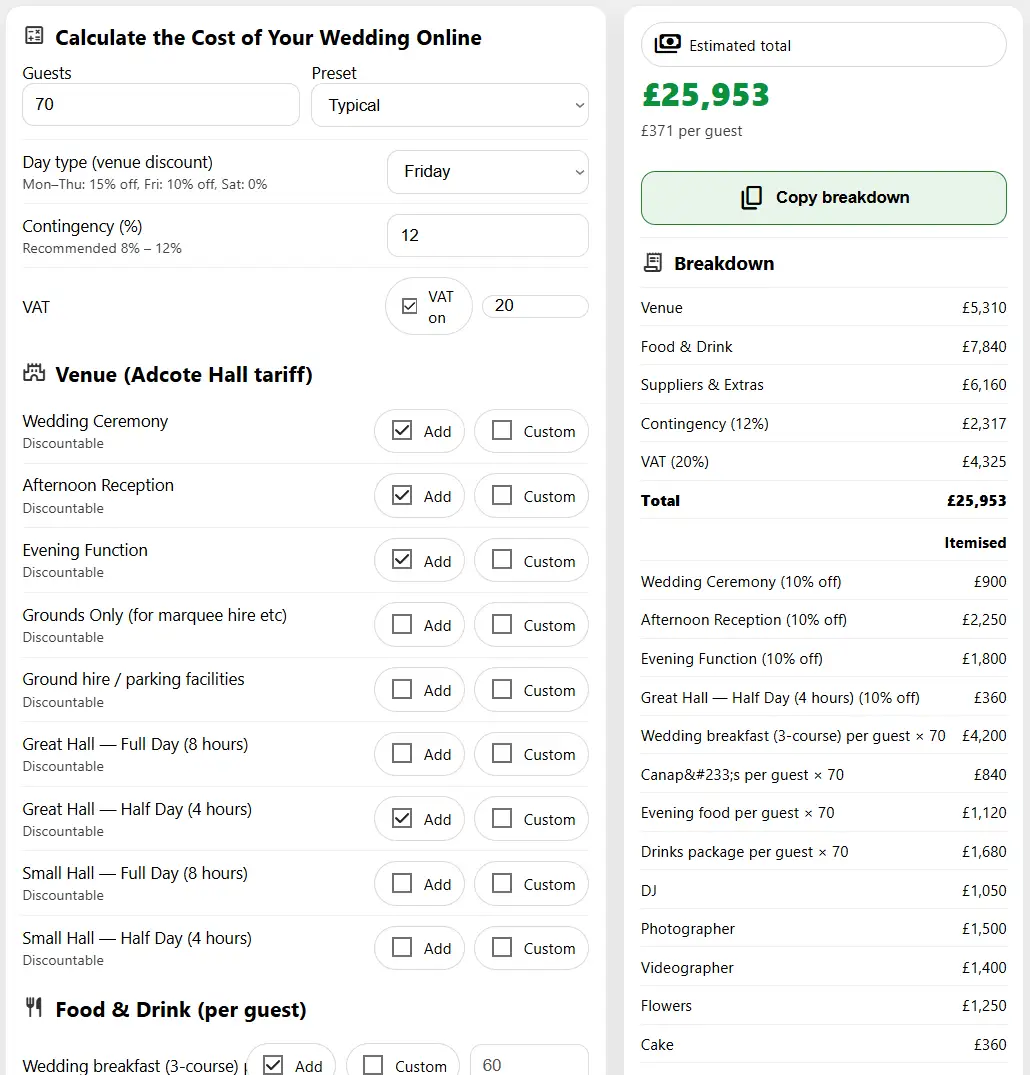
You can get a strong estimate in under five minutes. Start simple, then refine when you receive quotes.
Step 1: Set your starting assumptions
- Guests: enter your expected number (even a rough estimate is fine).
- Preset: choose Budget, Typical, or Premium as your baseline.
- Day type: pick the day category to apply venue discount rules.
Step 2: Add venue items you actually need
In the Venue section, switch on only the items that apply to your plan. If you already have a quote, enable Custom and enter the exact value.
- Add: includes the item in your estimate.
- Custom: lets you override the default price for that item.
Step 3: Choose food and drink (per guest)
Per-guest items scale with guest count, so they have the biggest impact on the final cost. Start with the preset defaults, then customise when you decide on packages.
Step 4: Toggle suppliers and extras
Enable only what you plan to book. If you’re unsure, keep an item enabled but use a conservative number, then refine later.
Step 5: Set contingency and VAT
- Contingency: keep this on (10% is a practical default for planning).
- VAT: toggle on if your pricing should include VAT, and set the percentage.
Step 6: Review totals and copy the breakdown
Check the category totals, then read the itemised list to see what is driving the number. Use Copy breakdown to paste the estimate into notes, a budget document, or an email.
How to Save Money Without Losing Quality
One of the biggest advantages of using a calculator early is seeing where money actually goes. Most couples overspend not because they choose luxury everywhere, but because many small decisions quietly add up.
Focus on the biggest cost drivers first
Before cutting flowers or favours, review the areas that move the total the most:
- Guest count — every extra guest multiplies catering, drinks, seating, stationery, and often venue staffing.
- Food & drink per guest — a £10 change per guest becomes £1,000 with 100 guests.
- Day of the week — weekday or Friday weddings often unlock venue discounts.
| Saving Strategy | Where to Apply | Typical Saving | Impact on Experience | Best For |
|---|---|---|---|---|
| Reduce guest list | Catering, drinks, seating | High | Low if planned carefully | Intimate weddings |
| Choose weekday / Friday | Venue hire | Medium–high | Minimal | Flexible schedules |
| Simplify drinks packages | Bar & reception | Medium | Low | Large guest lists |
| Limit suppliers | Extras & upgrades | Medium | Varies | Budget-focused couples |
Smart compromises that guests rarely notice
- Shorter drinks reception instead of a full open bar.
- Seasonal flowers rather than imported varieties.
- Shared dessert table instead of an elaborate multi-tier cake.
- Digital stationery for save-the-dates and RSVP management.
Where not to cut too hard
Some areas strongly affect guest comfort and memories:
- Food quality and portion sizes.
- Professional photography (your long-term keepsake).
- Sound and lighting for evening celebrations.
Common Budget Mistakes to Avoid
Most overspends come from planning gaps rather than bad choices. The calculator helps highlight these early — but it’s still useful to know where couples often misjudge costs.
Underestimating per-guest spending
Couples often budget only for catering and forget that drinks, glassware, staff, and late-night food also scale with guest count. Always review the per guest number, not just the headline total.
Forgetting VAT and service charges
- Some quotes exclude VAT.
- Some venues add service charges on top.
- External suppliers may apply different VAT rates.
Tip: Toggle VAT on in the calculator early so your planning total matches reality.
Ignoring contingency
Last-minute costs are almost guaranteed: extra décor, weather solutions, timetable extensions, or guest changes. Planning with 8–12% contingency usually prevents budget stress in the final month.
Locking decisions too early
Avoid finalising guest numbers and packages before receiving several quotes. Use the calculator to test ranges first, then narrow down when prices are confirmed.
Practical Wedding Budget Planning Advice
A good wedding budget is flexible, realistic, and aligned with your priorities. The calculator becomes most powerful when combined with a simple planning strategy.
Set your “comfort ceiling” first
Before filling in details, decide the maximum number you are comfortable spending. Then work backwards inside the calculator until the estimate stays below that line.
Prioritise what matters most to you
- Experience-focused couples: invest more in food, drinks, and atmosphere.
- Memory-focused couples: prioritise photography, video, and décor.
- Guest-focused couples: protect comfort and hospitality first.
Review your budget at three key moments
- After initial planning — rough structure and priorities.
- After receiving main quotes — refine custom prices.
- One month before the wedding — final check with contingency and VAT.
| Planning Stage | Main Goal | What to Adjust | Typical Outcome | Risk to Watch |
|---|---|---|---|---|
| Early planning | Set structure | Presets, guest count | Rough total | Too optimistic assumptions |
| Quote phase | Improve accuracy | Custom prices | Near-final total | Hidden extras |
| Final month | Avoid surprises | Contingency, VAT | Safe final figure | Late changes |
Choosing Suppliers Without Overpaying
Suppliers account for a large part of your wedding budget, and prices vary widely depending on experience, season, and demand. The calculator allows you to test realistic ranges before committing to contracts.
Compare value, not just price
The cheapest quote is rarely the best option. Focus on:
- Package contents — hours, equipment, staff, and setup time.
- Experience with your venue type — reduces delays and technical issues.
- Flexibility — ability to adjust timings, playlists, or coverage.
Typical supplier price ranges
| Supplier Type | Basic Range | Typical Range | Premium Range | What Affects Price |
|---|---|---|---|---|
| Photographer | £800–£1,200 | £1,200–£2,000 | £2,000+ | Hours, albums, second shooter |
| DJ / Band | £500–£900 | £900–£1,600 | £1,600+ | Equipment, setup, travel |
| Flowers | £300–£800 | £800–£1,800 | £1,800+ | Season, scale, installations |
| Decor & Styling | £300–£700 | £700–£1,500 | £1,500+ | Furniture, lighting, logistics |
When bundled packages make sense
- Venue-recommended suppliers often reduce coordination risks.
- Packages may include sound, lighting, and staffing together.
- Discounts are common when booking multiple services from one provider.
Understanding Venue Pricing and Discounts
Venue hire is usually the single largest fixed cost. Small timing changes can significantly affect the final total.
What is usually included in venue hire
- Ceremony and reception spaces.
- Furniture and basic layout setup.
- Core staffing and coordination.
- Cleaning and security.
Common extras to watch for
- Extended hours or late-night surcharges.
- Exclusive-use fees.
- Outdoor ceremony setup.
- Power, lighting, and technical support.
How day selection changes your budget
Using the day-type selector in the calculator shows how discounts affect totals:
- Monday – Thursday: often 10–20% cheaper.
- Friday: moderate savings, good availability.
- Saturday: premium pricing, highest demand.
Final Budget Check Before Booking
Before confirming any major contracts, run a final version of your plan through the calculator. This prevents surprises after deposits are paid.
Essential final checks
- Guest count matches catering and seating plans.
- All suppliers are marked as enabled.
- Custom prices reflect written quotes.
- VAT and contingency are switched on.
Create two versions of your budget
- Optimistic version: best-case scenario with minimum extras.
- Safe version: includes contingency, VAT, and buffer guests.
Tip: Save or copy the breakdown after every major update so you can track how your plan evolves.
FAQ – Wedding Cost Calculator Questions
Is this calculator accurate?
The calculator provides realistic estimates based on typical UK pricing. Final totals depend on supplier quotes, venue policies, guest changes, and seasonal demand.
Should I include contingency?
Yes. Most weddings exceed their initial plan by 5–12% due to late changes. Including contingency early prevents last-minute stress.
Does the calculator include hidden costs?
It covers venue hire, per-guest costs, suppliers, VAT, and contingency. You should still consider rings, attire, accommodation, and honeymoon separately.
Can I use this before choosing a venue?
Absolutely. The calculator helps you test budgets and priorities before shortlisting venues or requesting quotes.
How often should I update my estimate?
- After receiving each major quote.
- When guest numbers change.
- One month before the wedding.
What is a realistic per-guest budget in the UK?
Most couples spend between £120 and £220 per guest, depending on venue type, catering level, and supplier choices.